

Introduction
In the previous parts of this series, we focused on errors that occur during the establishment of a TCP connection.
- In Part 1, we examined “address already in use,” a local bind conflict on the server.
- In Part 2, we looked at “connect timeout,” where SYN packets receive no response.
- In Part 3, we explored “connection refused,” where the destination host explicitly rejects the connection with a RST because no process is listening on the target port.
In this fourth part, we move beyond connection setup and into the data-transfer phase, where a different class of errors can occur. This chapter focuses on the “connection reset by peer” error – often abbreviated as RST or ECONNRESET. Unlike a timeout or refusal, this error happens after a connection has been successfully established. It indicates that one endpoint has abruptly aborted the connection by sending a TCP RST segment instead of closing the connection gracefully.
As in earlier chapters, this part is structured into three subsections:
- TCP Insights – introduces graceful vs. abortive shutdown, half-closed connections, and why operating systems or applications send RST packets.
- Error Behavior – explains what happens on the wire when a reset occurs and how it differs from a normal FIN-based teardown.
- Troubleshooting – provides practical steps for identifying which side sent the reset and what caused it, including server logs, process monitoring, and packet captures.
All demonstrations again use the TCP/IP & DNS Sandbox Git repository, allowing you to reproduce reset scenarios and observe their packet-level behavior with tcpdump or Wireshark. Understanding connection resets is essential for diagnosing intermittent failures, protocol errors, and unexpected application disconnects in real-world systems.
TCP Insights
Once a TCP connection has been established and data exchanged, it must eventually be closed.
TCP defines two fundamentally different ways to end a connection – graceful termination (FIN-FIN sequence) and abortive termination (RST).
In the normal, cooperative FIN-FIN scenario, each endpoint closes its output stream when it has finished sending data. This is done by sending a TCP segment with the FIN (finish) flag set. The other side acknowledges the FIN and, when it has no more data to send, transmits its own FIN in return. This sequence ensures that all data has been delivered before the connection is fully torn down. At the end of this orderly exchange, both endpoints enter the TIME_WAIT and CLOSED states, and the connection is cleanly terminated. The following diagram illustrates the graceful termination with the FIN-FIN sequence.
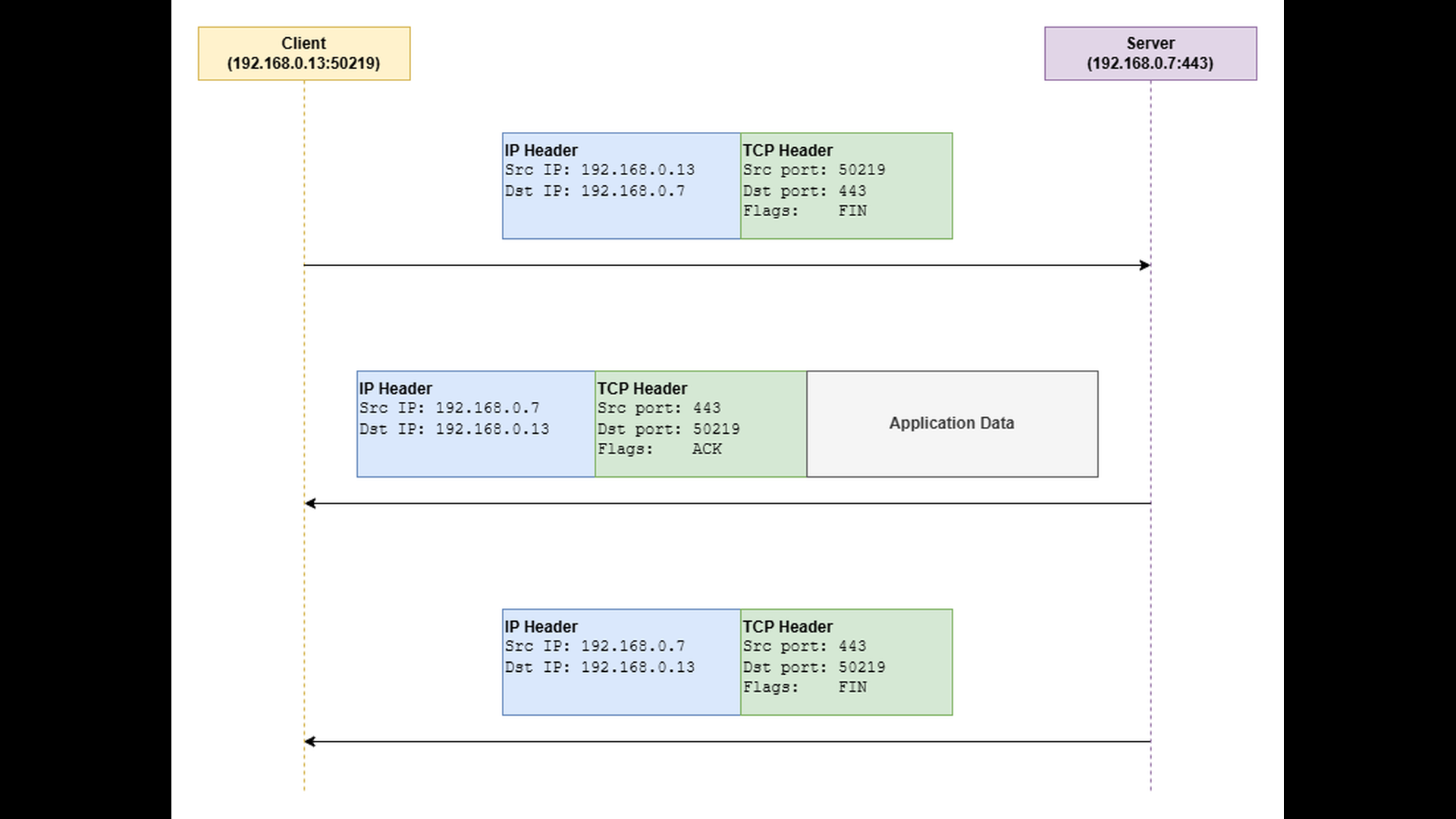
It is important to note that TCP is a full-duplex protocol – meaning that data can flow independently in both directions. When one endpoint closes its output stream and sends a FIN, it only indicates that it will send no more data. The other endpoint can still continue sending data in the opposite direction until it also decides to close its output stream. This behavior is known as a half-close, and it allows one side to finish sending while still receiving.
Sometimes, an endpoint needs to immediately abort the connection rather than close it gracefully.
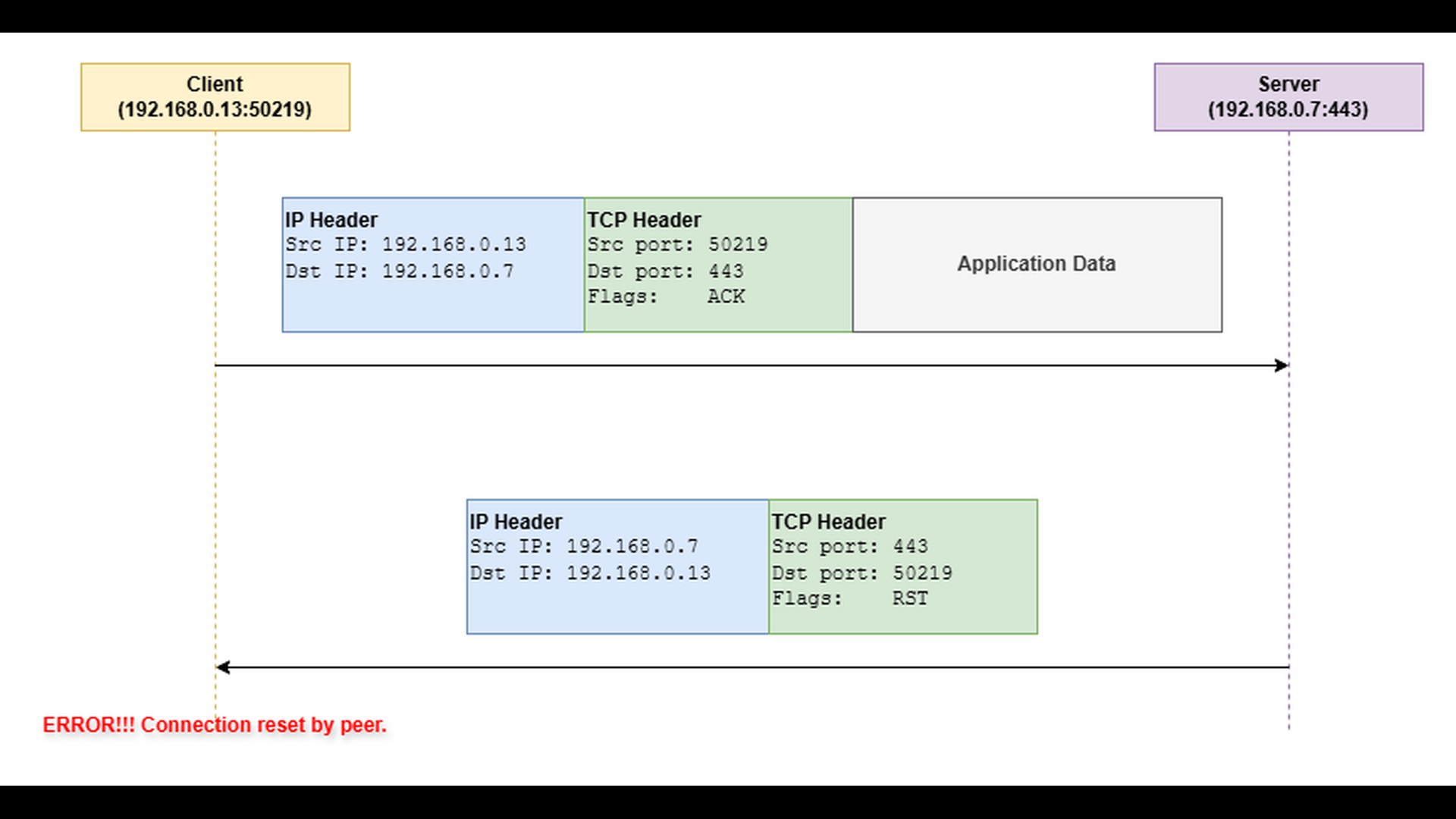
In this case, it sends a TCP segment with the RST (reset) flag set. A reset indicates that the connection should be dropped instantly, discarding any unsent or unacknowledged data. The RST approach is often used when an application or operating system detects an unrecoverable condition, such as:
- The process owning the socket terminates unexpectedly. When this happens, the OS automatically resets the connection on behalf of the terminated process. This can occur on either side – client or server.
- The application explicitly aborts the connection. For example, some TLS implementations may send an RST if a handshake fails or if an integrity violation is detected.
The following diagram illustrates the connection abort using the RST flag.
Error Behavior
When a TCP connection is terminated abruptly with a RST segment, the peer which has sent the RST segment immediately discards the connection state and releases all associated resources. From the perspective of the other endpoint, this event appears as a “connection reset by peer” error. The peer’s TCP stack receives the RST, invalidates the connection, and notifies the application that the socket is no longer usable. Subsequent reads or writes on that socket fail instantly with the above mentioned error.
Troubleshooting
Troubleshooting a “connection reset by peer” error largely depends on the application protocol and the context in which it occurs. For example, if the reset happens during a TLS handshake, you will likely need to investigate the TLS layer. If it occurs while an application connects to a database or another service, the relevant server logs should be examined. It can also be helpful to check whether the server process was restarted around the time of the error. In containerized environments such as Kubernetes, a reset may result from a Pod termination while Kubernetes is rescheduling it to another node. The following list provides some general troubleshooting hints:
- Determine which peer aborted the connection. Application logs may provide a clue, but not always. If the origin is unclear and the issue recurs, capture network traffic to identify which side sent the RST segment.
- Many database servers and network services close idle client connections after a period of inactivity. Verify the timeout settings on both client and server sides.
- Check the process ID or system logs of the affected service to see if a restart occurred near the time of the reset.
- In Kubernetes, monitor Pod status and events to confirm whether any Pods have been terminated or rescheduled.
To illustrate how the “connection reset by peer” error occurs in practice, we will use the TCP server and TCP client applications from the TCP/IP & DNS Sandbox repository. The demo runs on the AWS infrastructure provisioned by the accompanying Terraform configuration, but the applications behave the same way in any environment.
The goal is to compare a normal, cooperative connection termination with an abrupt, reset-based termination. Previous parts of this series already described how to capture network traffic using tools like tcpdump and how to analyze the results in Wireshark. For this reason, we focus directly on the Wireshark screenshots, without repeating the capture commands.
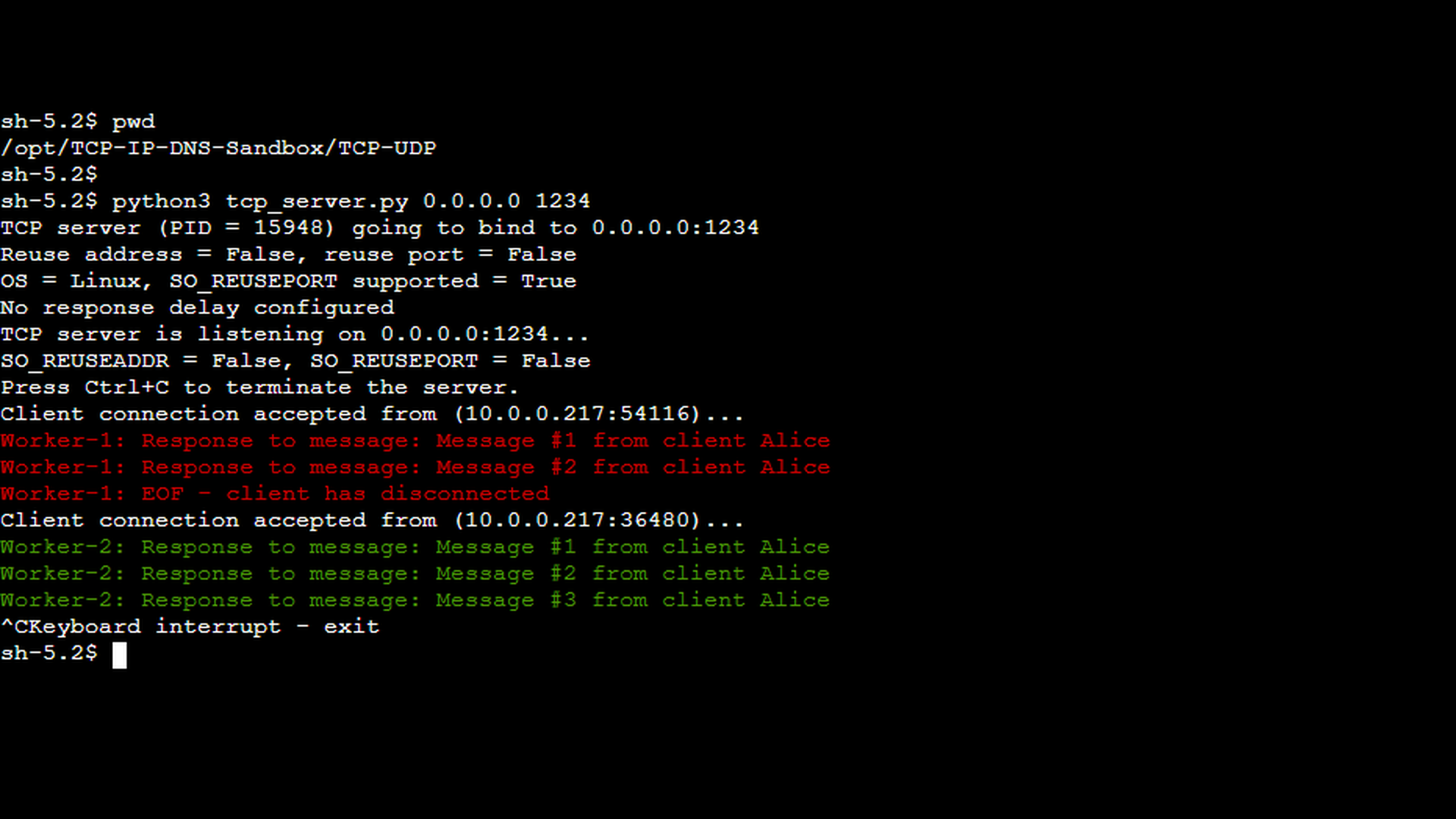
The first screenshot shows the TCP server handling two consecutive client sessions. The first of the clients (the red messages) was started with the -c 2 option, instructing it to send exactly two messages before terminating the connection gracefully. This results in a short session that ends with a normal, cooperative TCP shutdown.
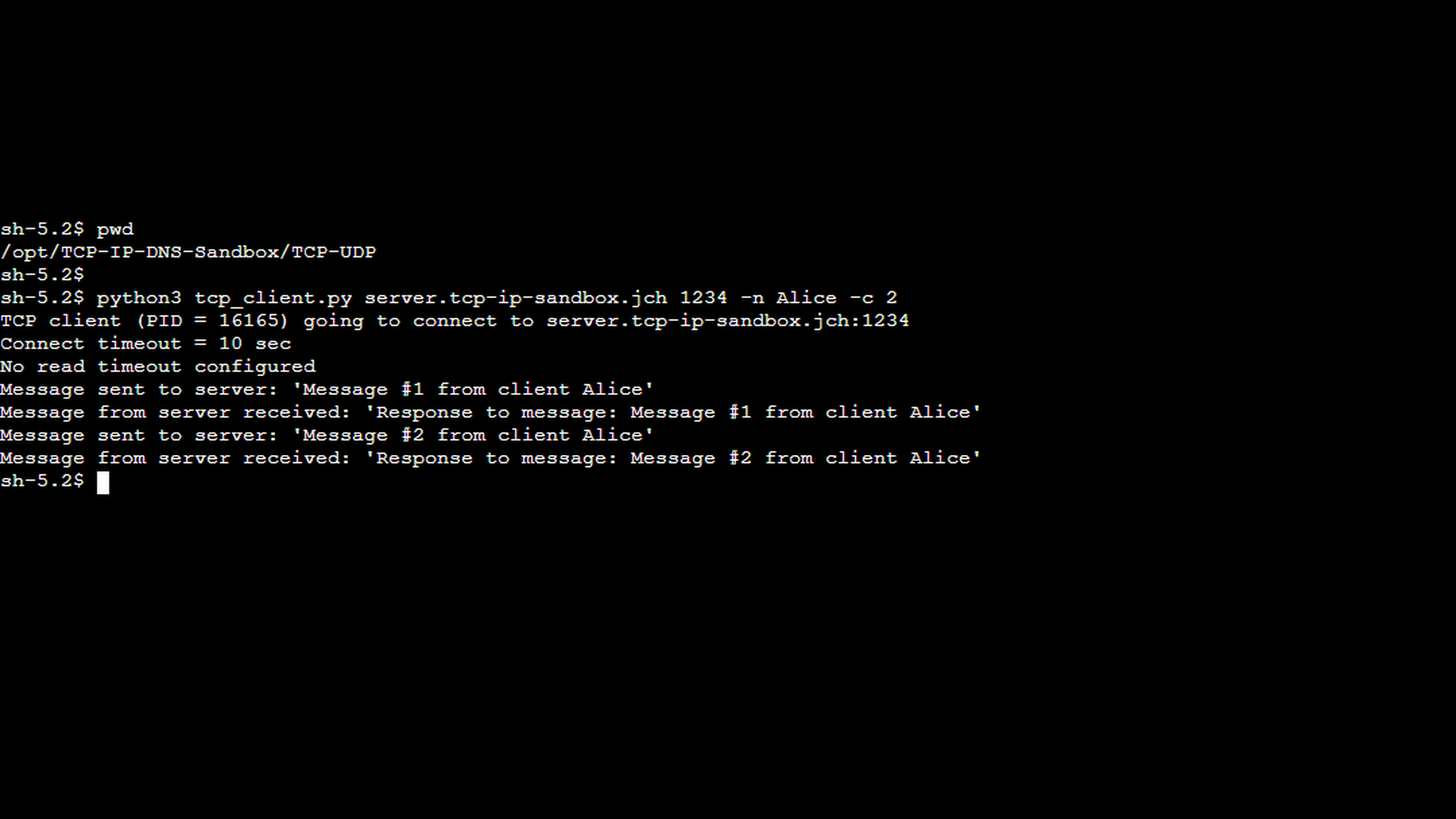
The corresponding client-side screenshot confirms this behavior: after sending the configured number of messages, the client closes the connection cleanly without reporting any errors.
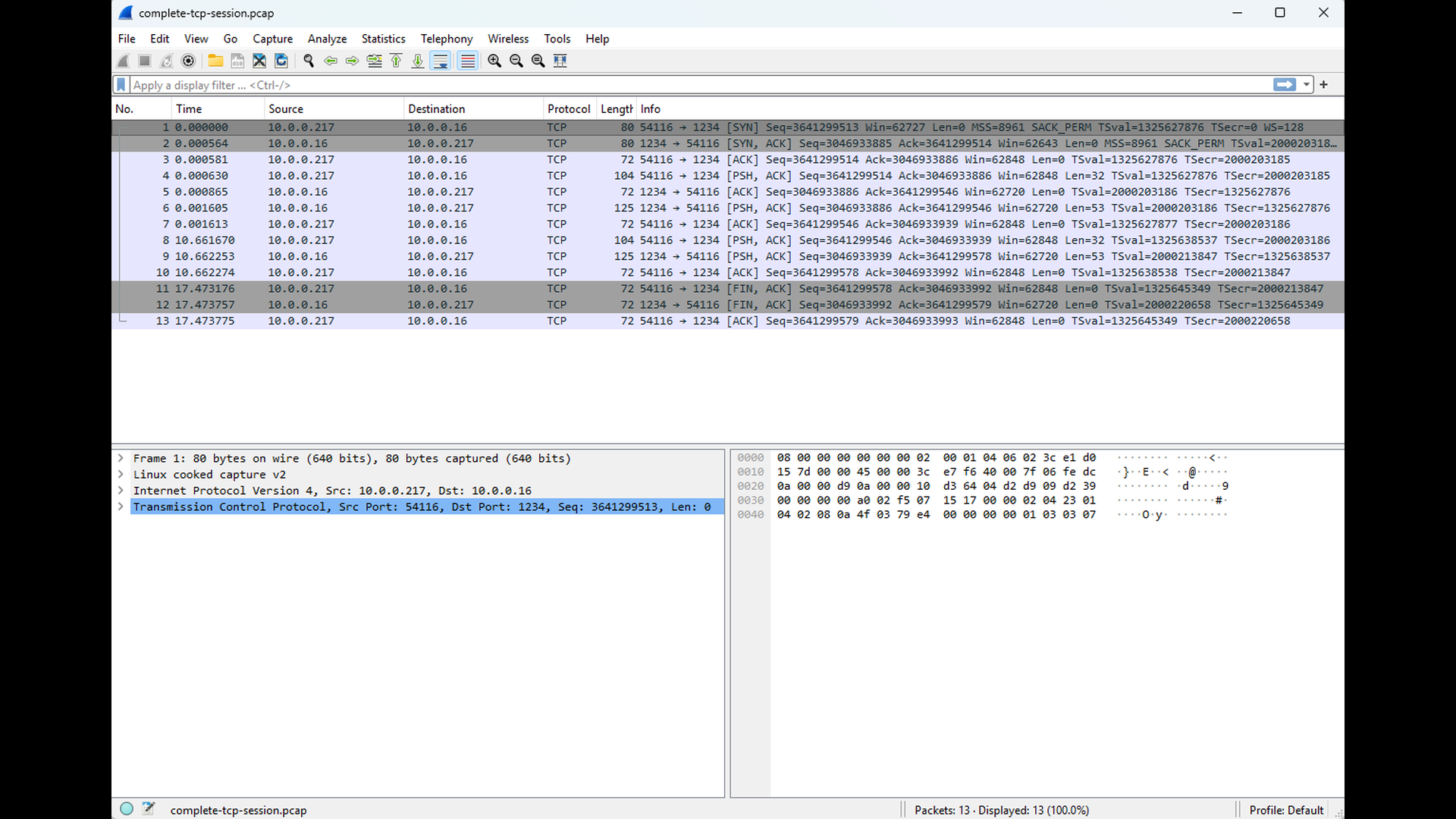
The Wireshark capture from the client side illustrates this normal shutdown sequence. You can see the expected FIN–FIN exchange, indicating that both endpoints closed their output streams in an orderly fashion. No RST packets appear in this trace, and the connection terminates cleanly.
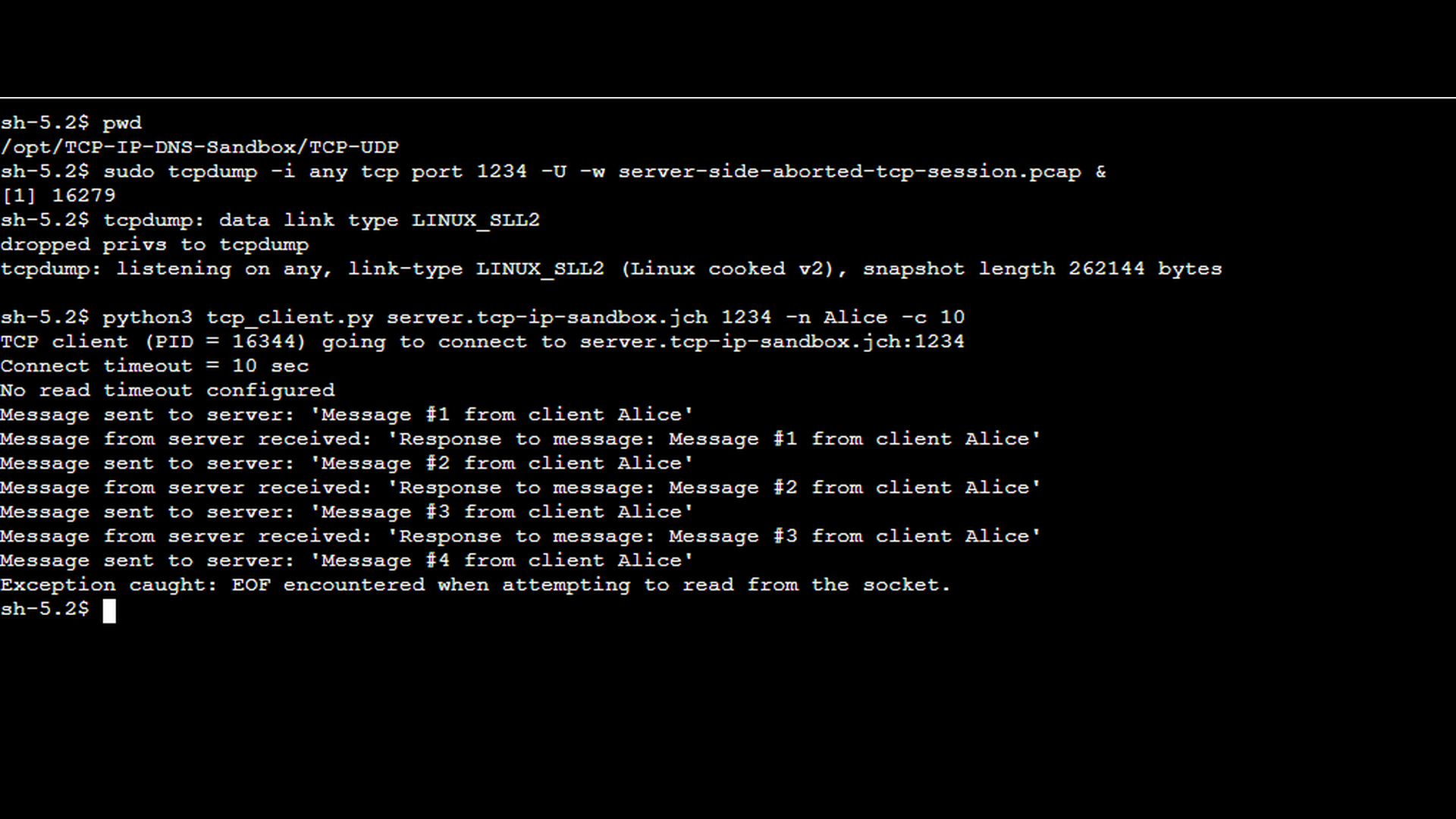
The next scenario demonstrates an aborted session. In this case, the TCP server process was terminated manually using Ctrl+C while a client connection was still active (see the green messages in the TCP server screenshot above). This simulates a real-world situation such as an application crash, forced shutdown, or container termination. On the client side (screenshot below), the TCP client reports a “EOF encountered while attempting to read from the socket” error, indicating that the connection was terminated abruptly rather than closed gracefully. It is worth noting that the exact error message depends on the client-side implementation and the socket API used. A TCP reset may be reported explicitly as “connection reset by peer” in some environments, while in others it appears as an unexpected end-of-file (EOF) condition during a read operation.
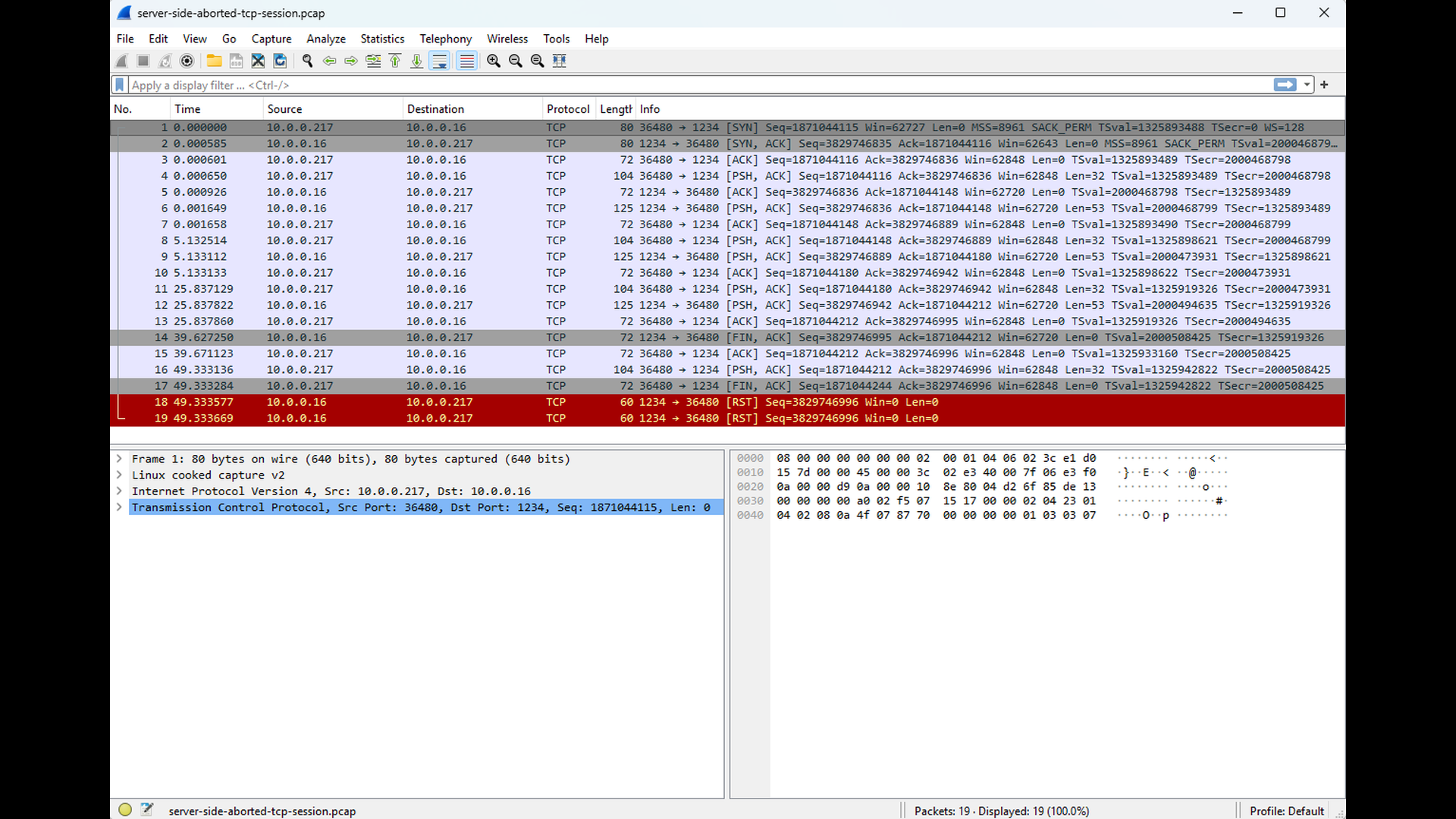
The corresponding Wireshark capture clearly shows the cause of this error. Instead of a FIN-based shutdown, the server’s TCP stack sends a RST segment to the client. Upon receiving the RST, the client immediately invalidates the connection and reports the reset to the application. As RST segments indicate potential problems, Wireshark automatically highlights them.
Conclusion
The “connection reset by peer” error is fundamentally different from the connection-establishment failures discussed in the earlier parts of this series. A reset occurs after a connection has been successfully established and indicates that one endpoint has aborted the connection abruptly by sending a TCP RST segment. Whether caused by an application crash, a protocol violation, an infrastructure component terminating the connection, or the operating system forcibly closing a socket, the behavior always reflects a deliberate and immediate teardown, bypassing the normal FIN-based shutdown sequence.
By understanding the mechanics of graceful vs. abortive connection closure – and recognizing what a reset looks like in logs and packet captures – you can quickly identify which side reset the connection and why. Tools such as Wireshark, tcpdump, and application logs are essential for pinpointing the root cause and distinguishing between normal disconnects and unexpected resets. The demonstrations in this chapter showed how a RST appears on the wire and how to verify which peer initiated the abort.
In the next part of the series, we will examine read timeout errors. Unlike resets, read timeouts do not involve abrupt connection termination. Instead, they occur when one endpoint waits too long for expected data from its peer. Understanding why data is not arriving – whether due to slow application processing, resource contention, or network issues – is key to diagnosing these timeouts effectively.

