

Introduction
In the previous part of this series, we examined “read timeout” errors – situations where an application waits too long for incoming data from its peer. In this sixth part, we turn to the complementary issue: the “write timeout” error, which occurs when an application attempts to send data but cannot do so within the configured timeout period.
Unlike connection establishment errors or abrupt resets, a “write timeout” error happens during an otherwise valid, established TCP connection. At the TCP level, the sender may still be connected and willing to transmit data. However, TCP flow control governs how much data can be sent at any moment, and the sender cannot transmit more data than the receiver is prepared to accept.
As in earlier chapters, this part is structured into three subsections:
- TCP Insights – explains the buffer mechanisms, window updates, and flow control rules that govern data transmission.
- Error Behavior – illustrates how a “write timeout” error occurs when the sender cannot transmit data and its output buffer fills.
- Troubleshooting – provides guidance on diagnosing slow readers, locating bottlenecks, analyzing window updates, and scaling receivers when needed.
The demonstrations in this part again use the TCP/IP & DNS Sandbox Git repository to reproduce window-shrink scenarios and observe how “write timeout” errors appear in packet captures and application logs. Understanding “write timeout” errors is essential for diagnosing slow or overloaded services, backpressure effects, and application-level performance bottlenecks in distributed systems.
TCP Insights
The socket API provides applications with simple read() and write() calls, but underneath lies a sophisticated machinery that the application never directly sees. Each endpoint of a TCP connection maintains its own input and output buffers, and the protocol operates in full-duplex mode – data can flow independently in both directions at the same time.
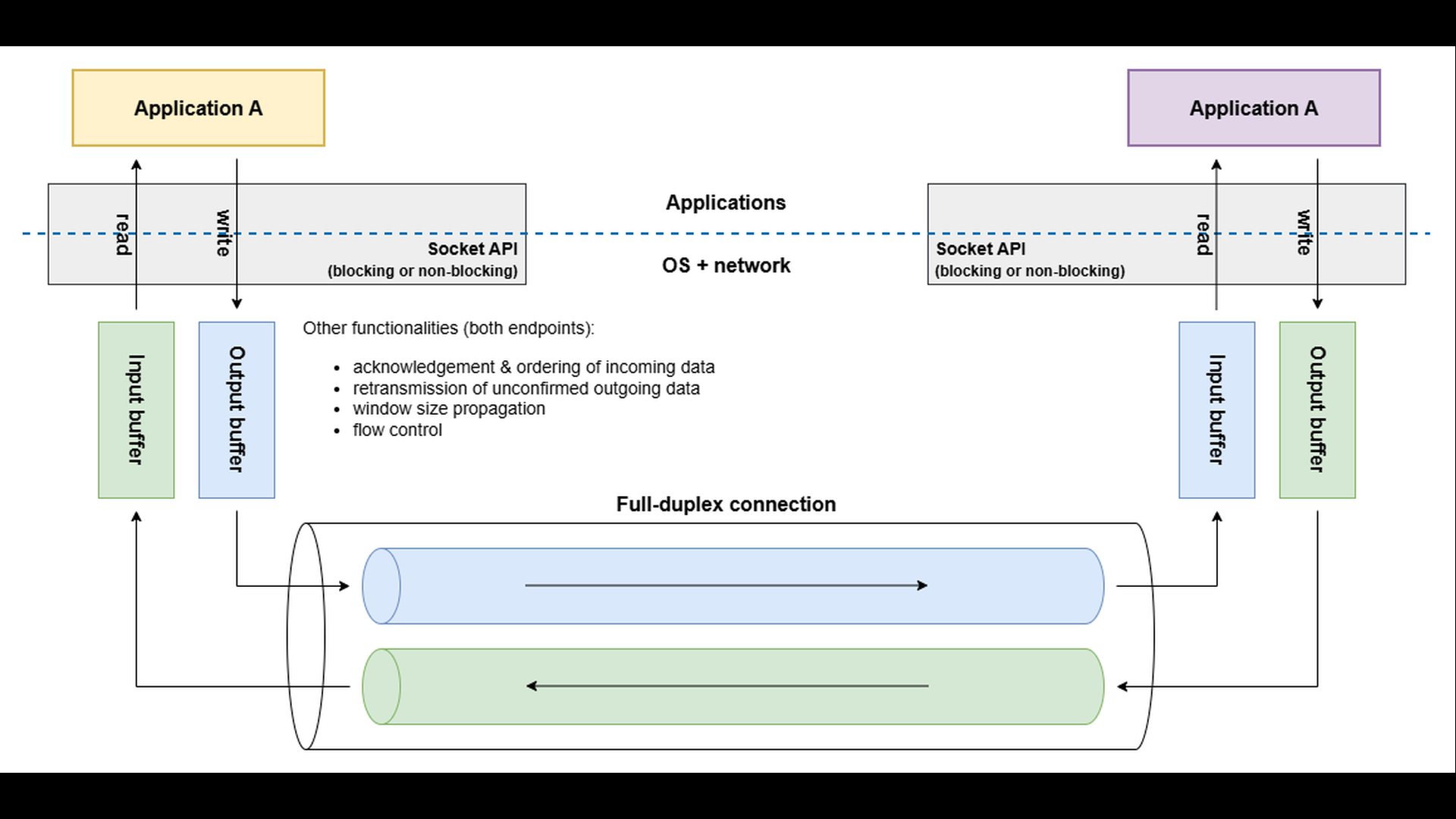
When an application writes to a socket, the data is first stored in the local output buffer. The TCP layer then decides when and how much of this data to send across the network. Transmission depends on several factors, such as network congestion, acknowledgment of previously sent data, and feedback from the peer about available buffer space.
When data arrives at the other endpoint, the TCP layer stores it in the local input buffer. The receiving application determines when the data will be read. If the receiving application processes data slowly – or stops reading altogether – its input buffer begins to fill up.
To prevent data loss and excessive buffering, TCP uses flow control. Each TCP header includes a Window Size field, which advertises the amount of free space currently available in the receiver’s input buffer. The sender’s TCP layer respects this advertised window: it will not transmit more data than the receiver can currently accept.
If one endpoint produces data faster than the peer consumes it, the receiver’s input buffer eventually fills up. The advertised window size shrinks, possibly reaching zero, indicating “stop sending – I’m full.” The sender’s TCP layer must then pause, keeping the data in its output buffer until the receiver advertises more free space.
Error Behavior
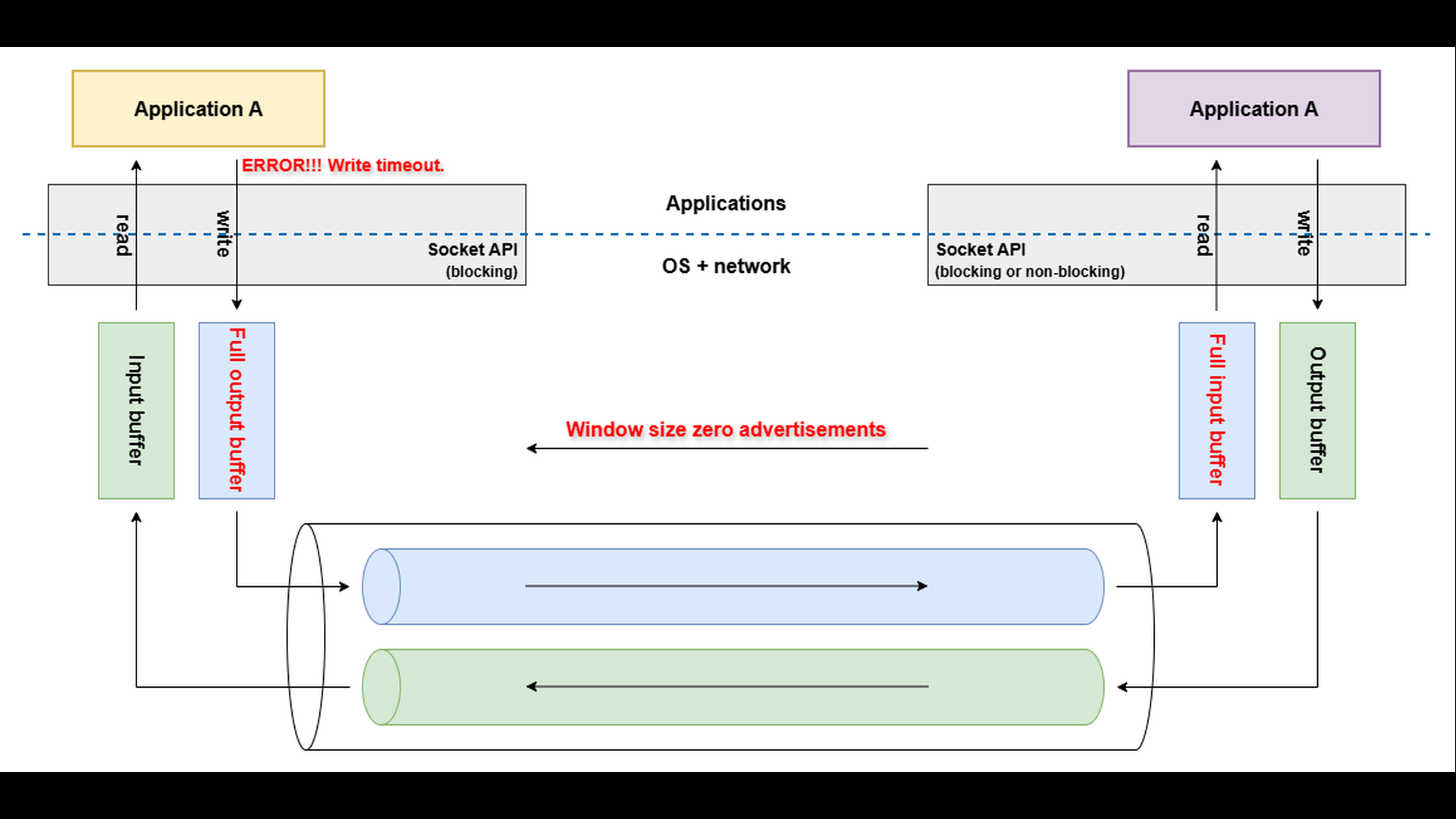
Even after the receiver’s TCP layer advertises a window size of zero, indicating that its input buffer is full, the sending application can still write data to the socket. This data is accepted by the local output buffer on the sender’s side – not sent immediately to the network.
As long as there is free space in the sender’s output buffer, the write operation continues to succeed.
However, if the receiver does not resume reading and free space in its input buffer, the sender’s TCP layer cannot transmit further data. The sender’s output buffer gradually fills up, and once it becomes completely full, any new attempt to write to the socket will block the write() operation (assumed the blocking API is used). If the blocked write does not complete within the configured write timeout, the operation fails and the application reports a “write timeout” error.
Troubleshooting
When diagnosing “write timeout” errors, the goal is to understand why the sender cannot transmit data fast enough – usually because the receiver’s input buffer is full or being drained too slowly. The first step is to capture the network traffic using tools such as tcpdump or Wireshark. Examine the Window Size field in the TCP headers of the ACK packets coming from the receiving endpoint. If you observe the advertised window gradually decreasing to zero, it means that the receiver’s input buffer is full and no longer able to accept additional data.
Once the window behavior is confirmed, the next step is to analyze why the receiving application reads data slowly. Possible causes include high CPU load, blocking I/O, or application-level backpressure (for example, a database or downstream service responding slowly). Monitoring resource consumption and response times on the receiving side can help pinpoint bottlenecks.
If the application’s throughput cannot easily be improved, consider scaling horizontally by deploying multiple instances behind a load balancer. A network load balancer (aka L4 load balancer) can distribute incoming TCP connections across several application instances, regardless of the application level protocol used. This approach spreads the incoming load and helps prevent individual receivers from becoming overwhelmed.
To illustrate how the “write timeout” error occurs in practice, we will use the hesitant consumer TCP server and eager producer TCP client applications from the TCP/IP & DNS Sandbox repository. The demo runs on the AWS infrastructure provisioned by the accompanying Terraform configuration, but the applications behave the same way in any environment.
In the previous parts of this series, we demonstrated successful message exchanges between a TCP client and server, including packet captures that showed normal data flow and acknowledgments. Those examples used the standard TCP client and standard TCP server applications from the sandbox and illustrated how data is exchanged when both endpoints actively send and receive messages.
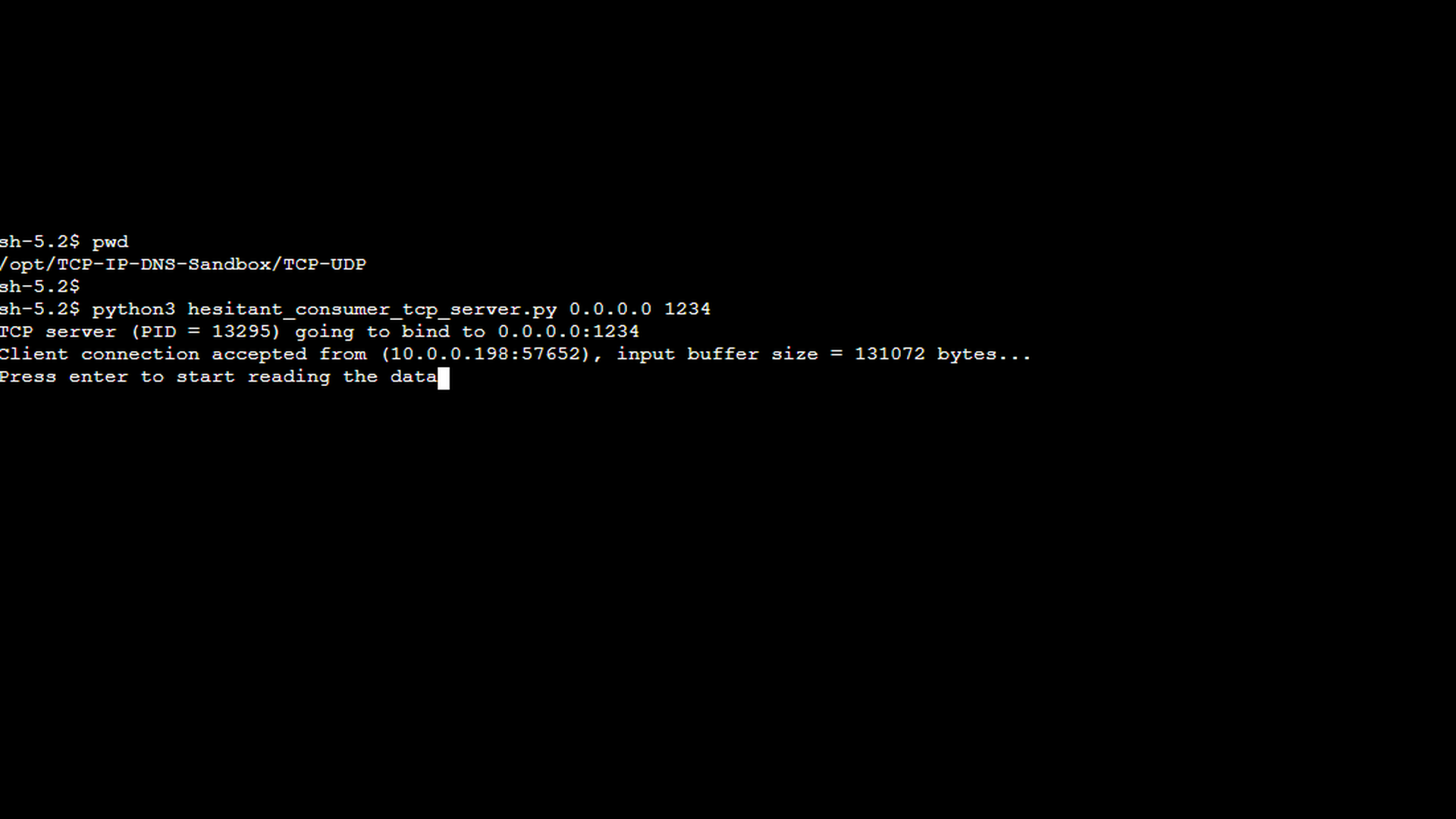
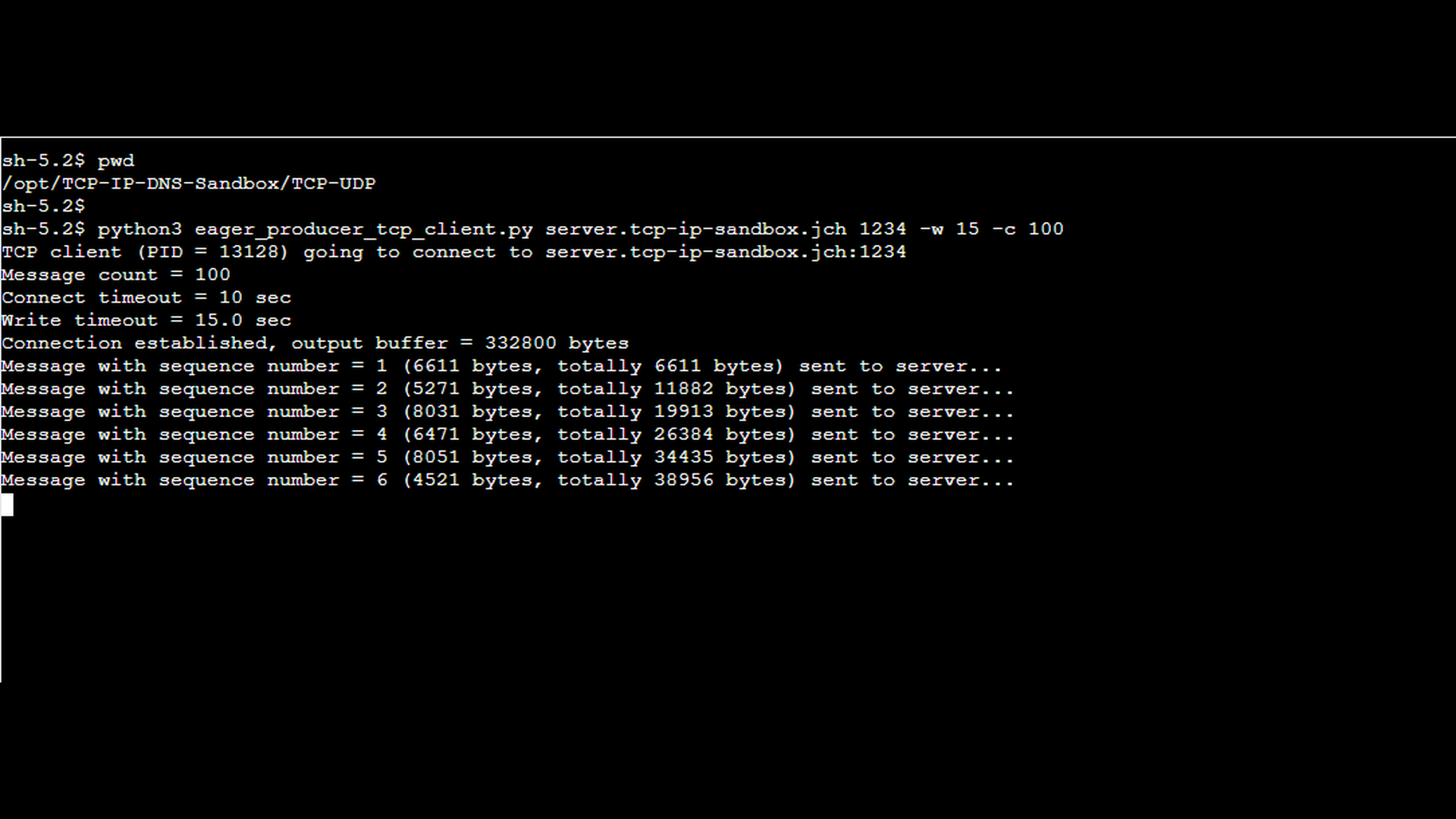
In this part, we deliberately move away from that normal behavior and introduce special-purpose applications designed to simulate write-side backpressure. The eager TCP producer client is an application that generates large amounts of data and sends it to the server. On the receiving side, the hesitant TCP consumer server accepts a single incoming TCP connection but intentionally does not read any data from the socket. As a result, incoming data accumulates in the server’s input buffer.
The first screenshot shows the special TCP server mentioned above. As illustrated, pressing Enter would cause the server to start reading data from the socket and thereby unblock the connection. However, for the purpose of demonstrating the “write timeout” error, allowing the server to resume reading is undesirable, as the goal is to let incoming data accumulate in the server’s input buffer.
The next screenshot shows the special TCP client mentioned earlier. The client periodically sends relatively large messages to the server, pausing for a random interval between 2 and 5 seconds after each send. The output indicates how many messages have already been sent, the size of each message in bytes, and the cumulative number of bytes transmitted to the server so far.
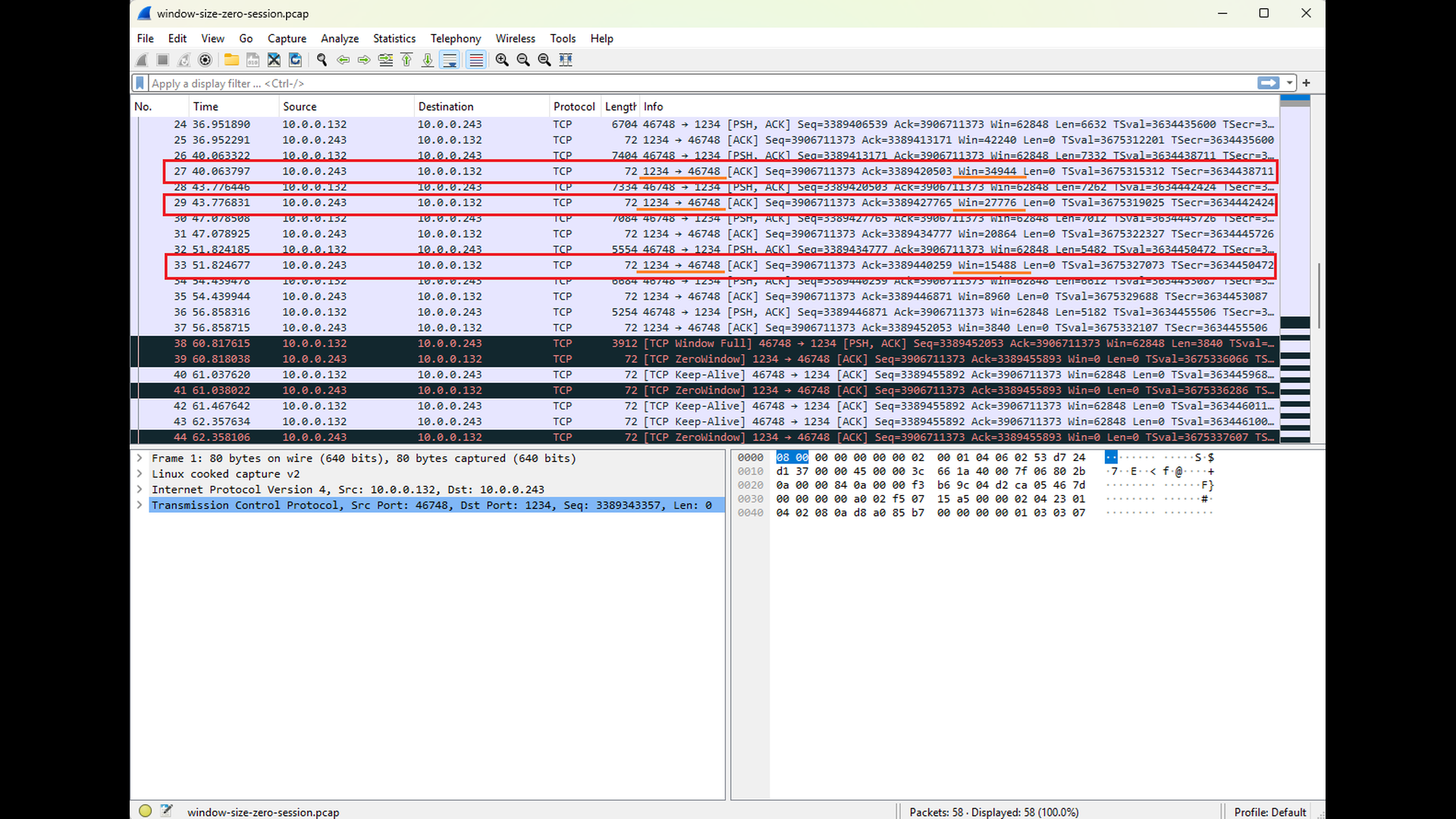
The following sequence of Wireshark screenshots illustrates how the Window Size advertisements sent by the server to the client reflect the decreasing free capacity of the server’s input buffer (see Win field for TCP segments sent from the TCP port 1234, highlighted with red and orange). This behavior contrasts with the Window Size advertisements sent by the client to the server: since the server does not send any data back, the client’s input buffer remains empty and its advertised Window Size stays constant (see the highlighted TCP segments sent to the TCP port 1234, highlighted with blue and green). The final screenshot in this sequence shows the server advertising a Window Size of zero. This condition signals that the server can no longer accept additional data and serves as a clear precursor to the “write timeout” error that follows. As noted in earlier parts of this series, Wireshark automatically highlights packets that may indicate potential issues. This behavior also applies to Window Size zero advertisements.
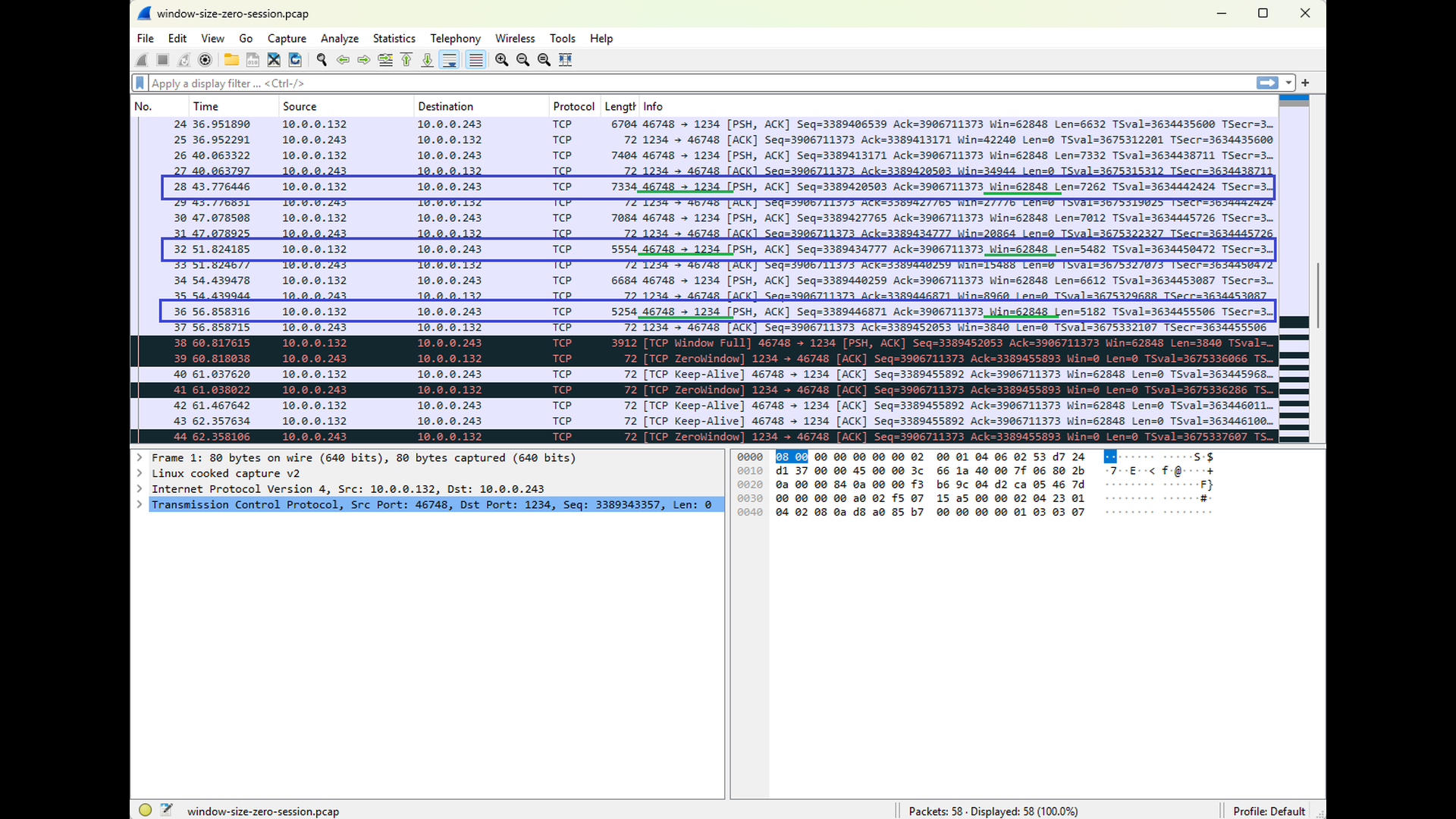
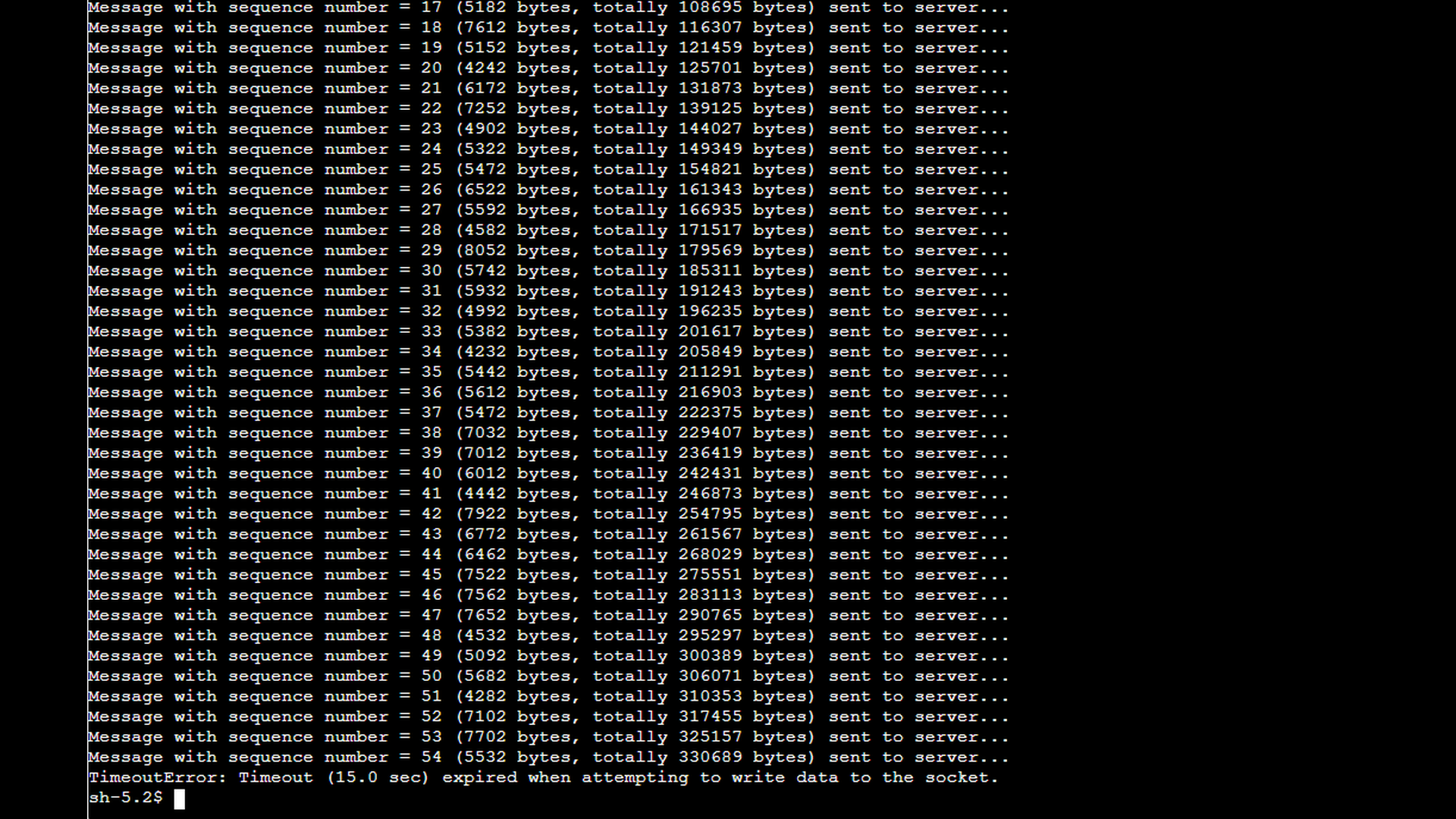
As shown in the final Wireshark screenshot above, once the client receives the Window Size zero advertisement, it stops sending data onto the network (the length of the TCP segments sent to the port 1234 is equal to zero). The TCP layer on the client side honors the zero-window condition and refrains from transmitting any additional data that the server would be unable to accept. At the same time, the client application itself can still write to the socket, which is visible in the application’s output. This data is buffered locally in the client’s output buffer. Only later, when the local output buffer becomes completely full, does the client application fail and report the “write timeout” error as depicted by the screenshot below.
If the user were to unblock the server’s reading of data after the client receives the Window Size zero advertisement, the server would begin consuming the accumulated data rapidly. The server contains an infinite loop that reads one message after another without any processing delay, so it would quickly drain its input buffer.
Once sufficient space becomes available in the server’s input buffer, the server’s TCP stack would start advertising a non-zero Window Size again. In response, the client’s TCP layer would resume sending data, and the connection would likely recover fully. In this scenario, the client application would also continue operating normally, as the local output buffer would no longer fill up. This recovery scenario highlights that a “write timeout” error is not necessarily caused by a broken connection, but often by prolonged backpressure that remains unresolved.
Conclusion
A “write timeout” error completes the picture of TCP data-transfer issues. Where “read timeout” errors occur because data does not arrive, “write timeout” errors occur because data cannot be sent – usually due to a slow or stalled receiver whose advertised TCP window has closed. By understanding how buffering, flow control, and window updates regulate the pace of data transmission, you can quickly distinguish between normal backpressure, overloaded applications, and genuine communication problems.
This final part also marks the conclusion of the entire series on understanding and troubleshooting TCP errors. Across the six parts, we explored:
- Local socket issues such as “address already in use”.
- Connection-establishment failures including “connect timeout” and “connection refused”.
- Mid-connection errors such as “connection reset by peer”.
- Data-transfer-timeout issues including “read timeout” and “write timeout”.
Each error reflects a specific event in the TCP state machine or a particular condition in the application or network stack. By mapping error messages back to these underlying behaviors – and by using tools like netstat, ss, lsof, tcpdump, and Wireshark – you gain a systematic, protocol-informed approach to diagnosing problems.
The examples in this series showed how to interpret socket tables, analyze packet captures, and correlate client- and server-side behavior. Combined with the TCP/IP & DNS Sandbox Git repository, you can reproduce these scenarios yourself and deepen your understanding through hands-on experimentation.
Although TCP is one of the oldest protocols still in active use, its behavior remains foundational in modern distributed systems, and the ability to troubleshoot it effectively is a valuable skill for developers, DevOps engineers, and system administrators alike. With a firm grasp of how TCP errors arise – and how to interpret what they really mean – you are now equipped to approach networking issues with clarity, confidence, and a solid mental model of the protocol behavior behind them.

